


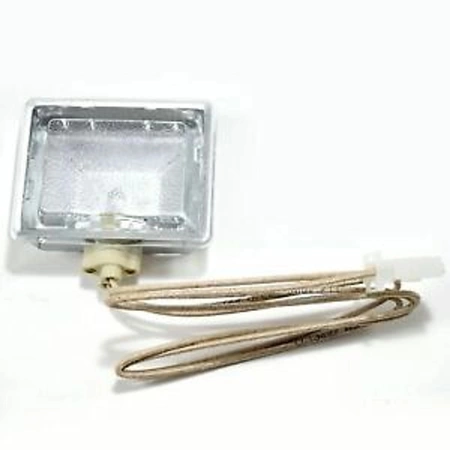
DE81-05611A Samsung Halogen Light Assembly


NLA:HALOGEN LIGHT ASSY
NLA:HALOGEN LIGHT ASSY
Please Verify Your Purchase to Submit a Review
1. Gather the necessary tools: Phillips screwdriver, LED light replacement, heavy-duty gloves, and safety glasses.
2. Unplug the electric stove and remove any debris or dust around it with a damp cloth.
3. Remove the screws holding the Samsung DE81-05611A HALOGEN LIGHT ASSY in place with a Phillips screwdriver.
4. Carefully pull out the old halogen light assy and disconnect any wires connected to it.
5. Connect the wires from the new LED light replacement to the corresponding places on the stove.
6. Place the new LED light assy into place over the existing mounting brackets and secure with screws.
7. Make sure the wiring is secure and turn on the power to the stove.
8. After the LED light has been tested, replace all covers and panels on the stove, and place back any debris that was removed during the process.
9. Dispose of the old halogen light assy properly.
Please keep in mind, these instructions are for general guidance and should always be used in conjunction with the manufacturer's manual, if available.
2. Unplug the electric stove and remove any debris or dust around it with a damp cloth.
3. Remove the screws holding the Samsung DE81-05611A HALOGEN LIGHT ASSY in place with a Phillips screwdriver.
4. Carefully pull out the old halogen light assy and disconnect any wires connected to it.
5. Connect the wires from the new LED light replacement to the corresponding places on the stove.
6. Place the new LED light assy into place over the existing mounting brackets and secure with screws.
7. Make sure the wiring is secure and turn on the power to the stove.
8. After the LED light has been tested, replace all covers and panels on the stove, and place back any debris that was removed during the process.
9. Dispose of the old halogen light assy properly.
Please keep in mind, these instructions are for general guidance and should always be used in conjunction with the manufacturer's manual, if available.
No more associated models for this part.

Login and Registration Form