


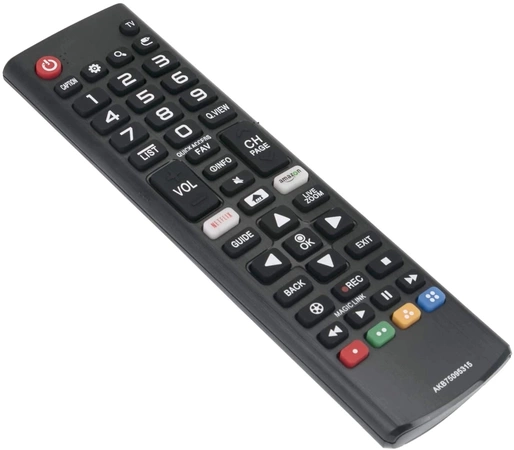
AKB75095315 LG Television Remote Control


AKB75095315 LG Television Remote Control
Weight : 0.20 lbs
Package Dimension : 8.66 x 2.60 x 1.38
AKB75095315 LG Television Remote Control
Weight : 0.20 lbs
Package Dimension : 8.66 x 2.60 x 1.38
Please Verify Your Purchase to Submit a Review
DIY Guide to Replacing Your AKB75095315 LG Television Remote Control
1. Start by gathering the necessary materials for the job: a new AKB75095315 LG remote control, a small Phillips head screwdriver, and a pair of needle-nose pliers.
2. Disconnect power from the television, then locate and remove the screws on the back of the TV.
3. Carefully remove the back panel of the television, then locate and remove the two screws holding the old remote control in place.
4. Gently pull the old remote control away from the television. There may be a few cables connected to the remote that need to be disconnected - use the needle-nose pliers to gently remove them.
5. Take the new AKB75095315 remote control and line up the pins on the back of the device with the holes on the television.
6. Secure the new remote in place with the two Phillips screws, then reattach the cables to the remote.
7. Put the back panel back onto the television, and secure it with the screws you removed.
8. Reconnect the television’s power and you’re done!
Please keep in mind, these instructions are for general guidance and should always be used in conjunction with the manufacturer's manual, if available.
1. Start by gathering the necessary materials for the job: a new AKB75095315 LG remote control, a small Phillips head screwdriver, and a pair of needle-nose pliers.
2. Disconnect power from the television, then locate and remove the screws on the back of the TV.
3. Carefully remove the back panel of the television, then locate and remove the two screws holding the old remote control in place.
4. Gently pull the old remote control away from the television. There may be a few cables connected to the remote that need to be disconnected - use the needle-nose pliers to gently remove them.
5. Take the new AKB75095315 remote control and line up the pins on the back of the device with the holes on the television.
6. Secure the new remote in place with the two Phillips screws, then reattach the cables to the remote.
7. Put the back panel back onto the television, and secure it with the screws you removed.
8. Reconnect the television’s power and you’re done!
Please keep in mind, these instructions are for general guidance and should always be used in conjunction with the manufacturer's manual, if available.
No more associated models for this part.


Login and Registration Form