




Please Verify Your Purchase to Submit a Review
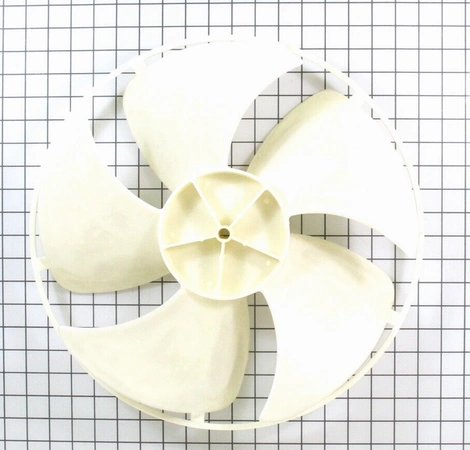
Replacing the LG 5900A10011D FAN-AXIAL
1. Start by turning off the power supply to the appliance. Disconnect the power to reduce the risk of electric shock and fire.
2. Remove the screws on the back or side of the appliance housing and remove the access panel.
3. Locate the fan motor and motor assembly. Disconnect any wires attached to the motor.
4. Remove the mounting screws that secure the fan motor to the appliance frame.
5. Carefully pull the fan motor from the appliance and remove any gaskets, filters, or other components and set aside.
6. Inspect the fan motor for wear and tear, and replace it if necessary.
7. Take note of the wiring configuration for the fan motor terminals, and record any labels that may be present.
8. Install the new fan motor in the appliance and reattach all wiring and components. Make sure the wiring is properly connected, and all components are securely fastened.
9. Reinstall the access panel and secure with the screws.
10. Reconnect the power supply to the appliance and turn it on. Test the fan to make sure it’s running properly.
Follow these DIY instructions on how to replace your LG 5900A10011D FAN-AXIAL and ensure your appliance runs smoothly and efficiently.
Please keep in mind, these instructions are for general guidance and should always be used in conjunction with the manufacturer's manual, if available.
1. Start by turning off the power supply to the appliance. Disconnect the power to reduce the risk of electric shock and fire.
2. Remove the screws on the back or side of the appliance housing and remove the access panel.
3. Locate the fan motor and motor assembly. Disconnect any wires attached to the motor.
4. Remove the mounting screws that secure the fan motor to the appliance frame.
5. Carefully pull the fan motor from the appliance and remove any gaskets, filters, or other components and set aside.
6. Inspect the fan motor for wear and tear, and replace it if necessary.
7. Take note of the wiring configuration for the fan motor terminals, and record any labels that may be present.
8. Install the new fan motor in the appliance and reattach all wiring and components. Make sure the wiring is properly connected, and all components are securely fastened.
9. Reinstall the access panel and secure with the screws.
10. Reconnect the power supply to the appliance and turn it on. Test the fan to make sure it’s running properly.
Follow these DIY instructions on how to replace your LG 5900A10011D FAN-AXIAL and ensure your appliance runs smoothly and efficiently.
Please keep in mind, these instructions are for general guidance and should always be used in conjunction with the manufacturer's manual, if available.
Compatible brands information is not available for this part.
Login and Registration Form