




Please Verify Your Purchase to Submit a Review
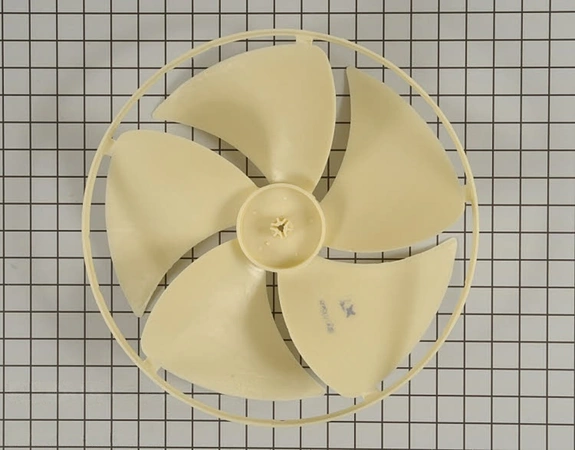
Replacing the 5900A10009E LG Air Conditioner Axial Fan
Replacing an air conditioner fan on an LG unit is an easy task, but it can be a bit daunting if you’re not a handy person. Fortunately, with a few simple steps, you can replace your fan and get your AC back up and running in no time.
Step 1: Turn off the Power
Before you begin any type of repair work, it’s important to shut off the power to the unit. The easiest way to do this is to switch the breaker to the OFF position at the main circuit breaker box. This will prevent any possible shocks or fires.
Step 2: Remove the Cover
Once the power is shut off, remove the cover from the LG unit by unscrewing the screws on each side. Once the cover is removed, you should be able to see the fan and its components.
Step 3: Remove the Old Fan
For this step, you will need a screwdriver. Begin by removing the screws that secure the fan to the unit. Once the screws are removed, the fan should come off easily.
Step 4: Install the New Fan
Once the old fan has been removed, it’s time to install the new one. Line up the fan so that the blade openings are facing the correct direction, then secure it with the screws you removed in Step 3.
Step 5: Reassemble the Unit
Once the fan is installed, you’ll want to reassemble the unit. Put the cover back on and secure it using the screws. Then turn the power back on, and you’re done!
Congratulations, you have successfully replaced the 5900A10009E LG Air Conditioner Axial Fan!
Please keep in mind, these instructions are for general guidance and should always be used in conjunction with the manufacturer's manual, if available.
Replacing an air conditioner fan on an LG unit is an easy task, but it can be a bit daunting if you’re not a handy person. Fortunately, with a few simple steps, you can replace your fan and get your AC back up and running in no time.
Step 1: Turn off the Power
Before you begin any type of repair work, it’s important to shut off the power to the unit. The easiest way to do this is to switch the breaker to the OFF position at the main circuit breaker box. This will prevent any possible shocks or fires.
Step 2: Remove the Cover
Once the power is shut off, remove the cover from the LG unit by unscrewing the screws on each side. Once the cover is removed, you should be able to see the fan and its components.
Step 3: Remove the Old Fan
For this step, you will need a screwdriver. Begin by removing the screws that secure the fan to the unit. Once the screws are removed, the fan should come off easily.
Step 4: Install the New Fan
Once the old fan has been removed, it’s time to install the new one. Line up the fan so that the blade openings are facing the correct direction, then secure it with the screws you removed in Step 3.
Step 5: Reassemble the Unit
Once the fan is installed, you’ll want to reassemble the unit. Put the cover back on and secure it using the screws. Then turn the power back on, and you’re done!
Congratulations, you have successfully replaced the 5900A10009E LG Air Conditioner Axial Fan!
Please keep in mind, these instructions are for general guidance and should always be used in conjunction with the manufacturer's manual, if available.
Compatible brands information is not available for this part.